How to
How to see every product on any Shopify store
How to get every product a shop sells into a spreadsheet in about ten minutes, for free, and the products this method will never show you.
Published 6 min read
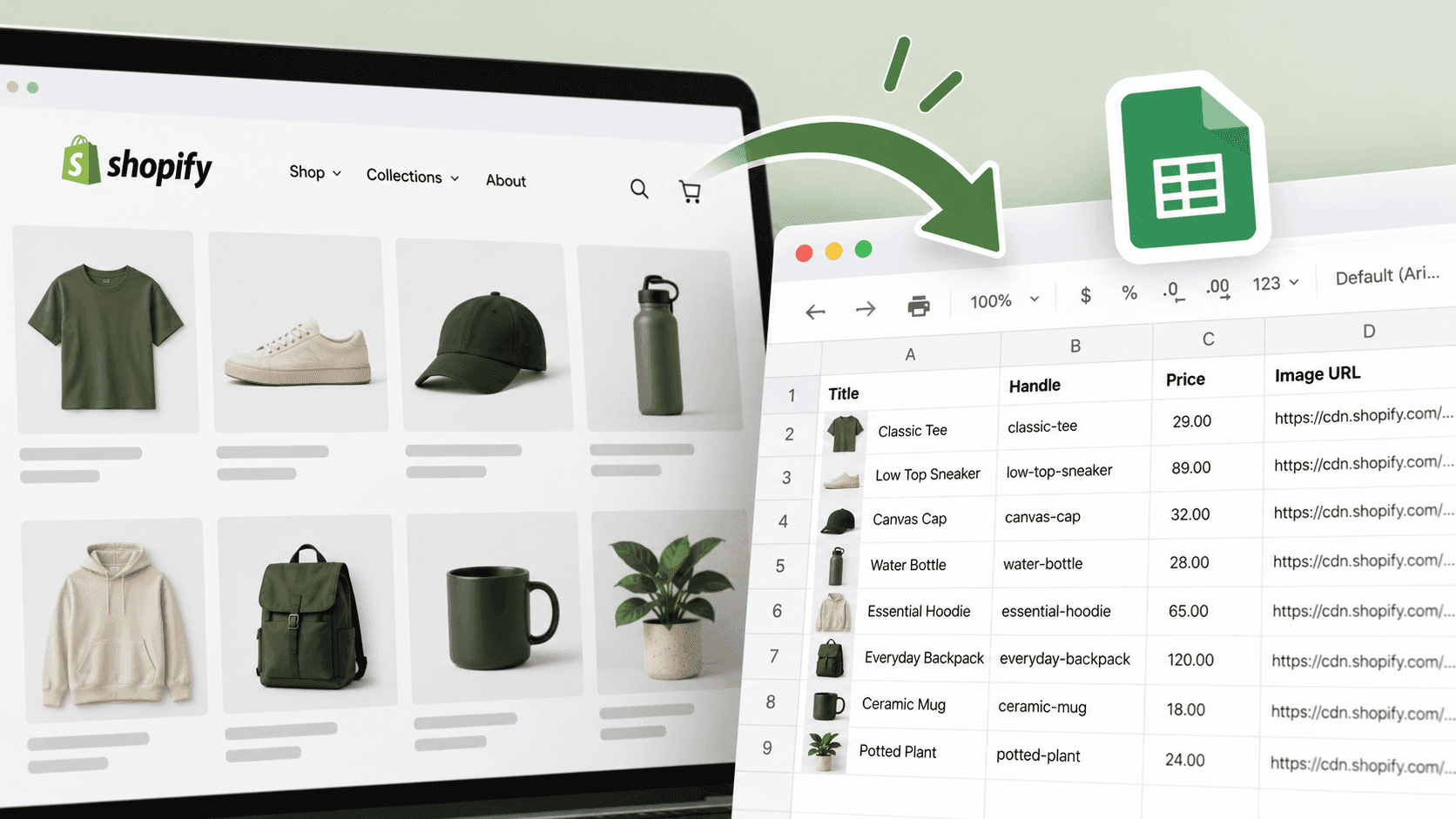
Add /products.json?limit=250 to the end of the shop's address, then step through the pages with &page=2, &page=3 and so on until a page comes back empty. Each page is the shop's own product list, with titles, prices, variants and dates, and it drops straight into a spreadsheet. For most shops the whole catalogue takes about ten minutes. Here is the method properly, and the honest account of what it leaves out.
Step one: check the shop is on ShopifyLink to this section
Ten seconds, and it saves you from wondering why nothing loads: how to tell.
Step two: fetch the pagesLink to this section
- Open
https://www.example-shop.com/products.json?limit=250. - Save the result. Put the shop name and today's date in the file name — you will want to compare against it later,
and a file called products.json in your downloads folder will be meaningless in a fortnight.
- Open
...?limit=250&page=2, save that, and keep going. - Stop when a page comes back with an empty product list. That is the end of the catalogue, and it is a clean,
unambiguous signal rather than something you have to guess at.
Pace yourself. This is a shop's ordinary web address and each page is a real request to their shop. A handful of pages, a few seconds apart, is a normal amount of browsing. Hammering a small business's site with hundreds of rapid requests is rude, may get you blocked, and is not necessary for anything you actually want to know.
Step three: get it into a spreadsheetLink to this section
Most spreadsheet programs will import this kind of structured text file and split it into columns. Failing that, there are free converters that turn it into a normal comma-separated file you can open anywhere.
The columns worth keeping:
| Column | Why you want it |
|---|---|
| Title | The obvious one |
| Handle (the web-friendly name) | The only stable identifier. Titles get edited; this rarely changes |
| Product type and tags | How the shop classifies its own range |
| Vendor | Whether the shop makes things or resells them |
| Created and published dates | When it was made, and when it went on sale |
| Updated date | When anything about it last changed |
| Variant prices | What it actually costs |
| Variant compare-at prices | The original price when something is marked down |
| Variant availability | Whether each option can be bought right now |
We confirmed on a real public store on 2026-09-22 that all of these are present: each product carries created_at, published_at and updated_at, and each variant carries price, compare_at_price and available.
Delete the descriptions before you do anything else. They are the bulk of the file and you almost never need them for analysis. Your spreadsheet will be far quicker without.
What to do with it once you have itLink to this section
Four questions the sheet answers in a couple of minutes each:
- How big is the range, really? Count the products, then count the variants. A forty-product shop with eight
sizes each is running a much bigger operation than the product count suggests.
- What does it cost to shop here? Sort by price. Look at the cheapest, the dearest, and where the middle sits.
That price shape tells you who the shop is for.
- What is discounted right now? Filter to rows where the compare-at price is higher than the price. The share
of the range that is marked down, and how deeply, is one of the most revealing numbers you can get for free. The fuller method for watching prices over time builds on this.
- What is new? Sort by published date.
How to read a shop's newest products covers the traps in that.
When the method does not workLink to this section
The address returns nothing. Some shops block it and some sit behind protection that wants to check you are a person. This is not unusual and it is not a sign of anything suspicious. Fall back to the shop's sitemap: every Shopify store publishes one automatically, and its product file lists the address of every product page. You lose the prices and dates, but you get the complete list of products, which is often the thing you wanted.
The shop is enormous. Past a few thousand products this stops being a ten-minute job, and a partial read of the most recent pages usually answers the question anyway. Be explicit in your notes that it is partial.
The pages seem to repeat themselves. Check you are changing the page number, and keep the handle column so you can remove duplicate rows. When we tested reading large catalogues across real shops in September 2026, we found that reads can repeat products unless you page through them in a deliberate order — so always de-duplicate on the handle before you count anything. A catalogue count inflated by repeats is worse than no count.
What this cannot tell youLink to this section
Only published products appear. Anything the shop is preparing, or has taken off sale, is absent. You are seeing the shop window, not the stockroom.
Nothing here shows what sells. This is the big one. You get the complete range and no indication of which parts of it move. A product that has sat unsold for two years looks identical to a bestseller.
Availability is not stock. You can see that an option is currently buyable. Never how many are left.
Prices are listed prices. Discount codes and basket-level offers are invisible, and a shop can set different prices for different countries.
It is a snapshot. One catalogue is a fact about today. The useful thing is two of them, a month apart — which is exactly why the dated file names matter.
When doing this by hand stops workingLink to this section
The method is free and it works. What it costs is attention: doing it on a schedule, for several shops, and comparing each new copy with the last one. That is the part that quietly stops happening.
StoreLenz is being built to do that reading for you and to tell you what changed rather than handing you another spreadsheet. Catalogue and price tracking are being built rather than finished today; what it does now says which is which.
Related readingLink to this section
- How to see what a competitor has just launched
- How to track a competitor's price changes
- How to tell if a website is built on Shopify
SourcesLink to this section
- Shopify Help Center, Finding and submitting your sitemap — https://help.shopify.com/en/manual/promoting-marketing/seo/find-site-map — read 2026-09-22
- Our own checks against a public store on 2026-09-22:
/products.jsonaccepts a page size and a page number, and each product carriescreated_at,published_atandupdated_atwithprice,compare_at_priceandavailableon every variant - Our own testing of large catalogue reads across a set of real public shops, September 2026, where repeated products appeared unless pages were read in a deliberate order
Written by Cristiano Pinto
shopify store expert